
Native Instruments
NI Guest Apartment Tool
Sign in with Microsoft
Checking availability…

Availability

Occupied
Public holiday
Blocked
Cleaning
Available

Book a Stay

A confirmation will be sent to your email address.

Max. 1 month per stay  ·  first-time new joiners only
The apartment is professionally cleaned on Saturdays only. If your arrival follows a recent non-Saturday departure, a full professional cleaning may not have taken place yet — please plan accordingly.
Apartment Information

Location & Finding Us

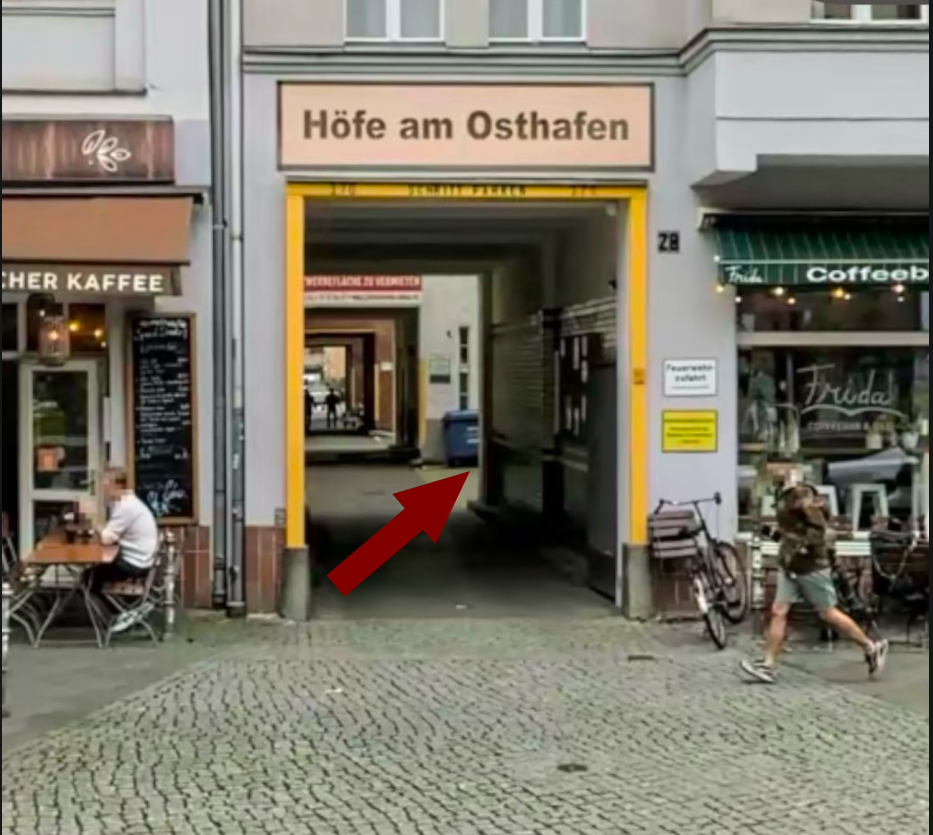
Schlesische Straße 28, 10997 Berlin

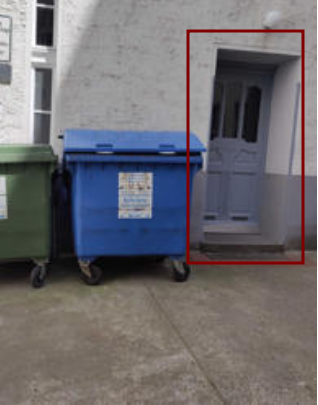
Enter the first backyard to the right — look for the blue door.
Take the stairs to the 2nd floor.
Door plate: "Native Instruments"

Walk through the gate
Blue door in the first backyard
Open in Google Maps ↗

Key Pick-up

NI Front Desk

Native River Office
Schlesische Straße 29

Mon–Fri · 10:00–17:00

Keys Issued

Building Key HR 70754

Opens the entrance door to the building (Schlesische Str. 28)

Apartment Key 0624197

Opens the apartment door on the 2nd floor

Main Gate Key HR 70782

Opens the main courtyard gate & the general waste bin area next to Native River

⚠ Lost key charge: €100 per key · Return all keys on departure

Facilities

Coffee makerWater boilerFridge Stove & ovenPots, pans & cutleryTV Vacuum cleanerHairdryerBedding & towels First aid boxCleaning supplies

Tea, coffee, spices, sugar & soft drinks are provided.

House Rules

·No smoking anywhere in the building
·Quiet hours: 22:00 – 07:00
·Lock apartment when leaving
·No unregistered overnight guests
·Max stay: 1 month (new joiners: once)
·Return all keys on departure

Garbage Disposal

Separate bins on the ground floor, next to the building entrance.

Paper
Plastic & Packaging
General Waste Next to Native River · main gate key

Food Delivery in Berlin

Order to Schlesische Straße 28, 10997 Berlin.

Lieferando
lieferando.de
Wolt
wolt.com/en
–
Currently Staying
–
Upcoming Guests
–
Pending Approval
–
Total Bookings
–
Occupancy
–
Avg. stay (nights)

Upcoming Bookings

No upcoming bookings.

Current Stay

No guest currently staying.

Bookings

Export CSV
GuestArrivalDepartureStatusTresor-PINKeysCleaningGuest Mail
Loading…

Blocked Dates

Blocked date ranges prevent new bookings. They appear in red on the availability calendar.

Add Blocked Period

FromToReasonAdded
Loading…

Reminder Rules

Automatic emails to all responsible persons (in German). Placeholders: {{guest_name}} {{arrival}} {{departure}} {{notes}}

Settings

Responsible Persons

These people receive all booking request and reminder emails.

NameEmail
Loading…

Emergency Local Login

Fallback passwords if SSO is unavailable. Leave blank to keep existing.

Booking Rules

Set to 0 to disable. Guests cannot book more than this many days in advance.

New guest bookings need approval before confirmation email is sent

Cleaning Company

Key Safe

PIN for the key safe at the entrance gate. If set, the key safe option is automatically included in confirmation and reminder emails.

Calendar Subscription (iCal) — Internal

Subscribe to the booking calendar in any iCal-compatible app (Apple Calendar, Google Calendar, Outlook). Shows guest names. The token is read-only — bookings cannot be changed via this URL.

Apartment Info in Guest Emails

Address, keys, facilities, house rules and delivery tips are automatically included in every guest email. To update this content, edit the FLAT constant in mailer.js.

Google Calendar

Audit Log

Last 200 entries. Automatically records logins, booking changes, and config updates.

TimeActionDetailsRoleIP
Loading…